





Whitelist visitors from the Turnstile challenge
Simple CAPTCHA with Cloudflare TurnstileUpdated September 13, 2026
Whitelisting lets specific visitors skip Turnstile entirely. The rules are in the Whitelist Settings panel on Settings › Cloudflare Turnstile. A whitelisted visitor sees no widget at all, and their submissions pass verification without a token.
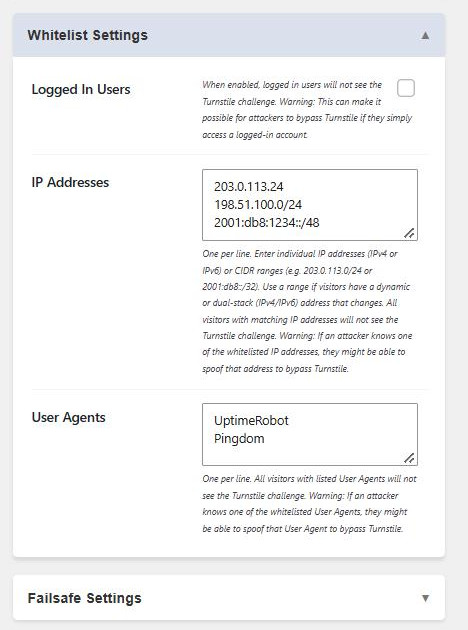
All three rules are additive: matching any one of them is enough to skip the challenge. The whitelist never applies on the plugin’s own settings page, so the API test always runs a real challenge.
Logged In Users
Skips the challenge for anyone signed in to the site. Convenient on a membership site where you only care about screening anonymous traffic.
The catch is that it makes an account the key to the whole protection. Anyone who registers, or who gets hold of a set of credentials, can then post without any check at all. If your registration form is open, weigh this carefully – you may be better off using the per-form Guest Checkout Only options, which are narrower.
IP Addresses
One entry per line. Both individual addresses and CIDR ranges are accepted, in IPv4 and IPv6:
203.0.113.24
198.51.100.0/24
2001:db8:1234::/48
Use a range when a visitor’s address changes – a dynamic home connection, or a dual-stack setup where the same person arrives over IPv4 one visit and IPv6 the next. Matching is done on the normalised binary form, so an IPv6 address written in a different but equivalent notation still matches, and an IPv4-mapped IPv6 address such as ::ffff:203.0.113.5 matches a plain 203.0.113.5 entry.
A /0 range is ignored deliberately. It would match every address on the internet, which is never a meaningful whitelist entry – it would just switch Turnstile off.
Behind a proxy or CDN, the visitor IP is taken from CF-Connecting-IP where present, then the usual forwarded headers, falling back to the direct connection address.
User Agents
One per line, matched as a substring of the visitor’s user agent string. UptimeRobot matches that service’s full user agent. This is mainly useful for monitoring services that need to reach a form.
The security trade-off
IP addresses and user agents can both be spoofed. If an attacker learns a whitelisted value, they can present it and bypass Turnstile on every protected form. Keep the lists short, prefer IP rules over user agent rules, and review them occasionally – a whitelist entry added for a one-off test has a way of staying there for years.