





Change the widget’s appearance
Simple CAPTCHA with Cloudflare TurnstileUpdated September 13, 2026
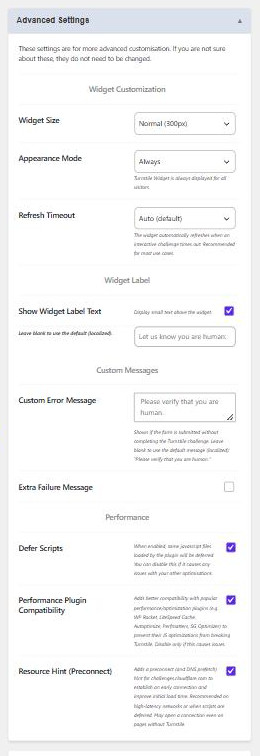
The widget’s look is controlled in two places on Settings › Cloudflare Turnstile: Theme and Language sit under General Settings, and the rest are inside the Advanced Settings panel under Widget Customization.
Theme
Light, Dark or Auto. Auto follows the visitor’s operating system preference, which is the right choice if your site has a dark mode; otherwise pick the one that matches your form background.
Language
Auto Detect uses the visitor’s browser language, and is the default. You can instead pin the widget to one of around 40 specific locales if your site only serves one language and you want the wording consistent regardless of the visitor’s browser settings.
Widget Size
- Normal (300px) – the default fixed width.
- Flexible (100%) – the widget fills the width of its container. Best inside narrow sidebars or wide checkout columns where a fixed 300px looks wrong.
- Compact (150px) – a narrow, taller variant for tight spaces.
Appearance Mode
Always displays the widget to every visitor. Interaction Only keeps it hidden and only reveals it in the cases where Cloudflare decides the visitor needs to interact, which makes it effectively invisible for most legitimate traffic.
Interaction Only gives the cleanest form, but it does mean visitors get no visual confirmation that a check is happening. On a login form, where a rejected submission is confusing, Always is often the kinder choice. The plugin handles the spacing for you in both modes, so nothing jumps around when a hidden widget appears.
Refresh Timeout
What happens when an interactive challenge is left unanswered long enough to time out:
- Auto (default) – the widget refreshes itself. Recommended for most sites.
- Manual – the visitor is prompted to refresh it themselves.
- Never – a timeout message is shown and nothing refreshes until the page is reloaded.
Widget Label
Turn on Show Widget Label Text to print a small line of text above the widget. Leave the text box empty to use the translated default, “Let us know you are human:”, or type your own. In Interaction Only mode the label is hidden until the widget actually appears, so it never sits above empty space.