





for WooCommerce
Turn “maybe later” into sales with
fast, friendly wishlists.
A simple, lightweight plugin that lets shoppers save the products they love, share their lists and come back to buy. Quick to set up, built for speed, with friendly support when you need it.
Bring shoppers back to buy what they saved
Simple Wishlists adds a heart button to your shop, product pages and WooCommerce product blocks. Shoppers save a product with one tap, even before they create an account, and find it again on a clean wishlist page with prices, stock and an “Add all to cart” button. They can share their list with friends and family, and with PRO you can email them when a saved product drops in price or comes back in stock.
Shoppers tap the heart
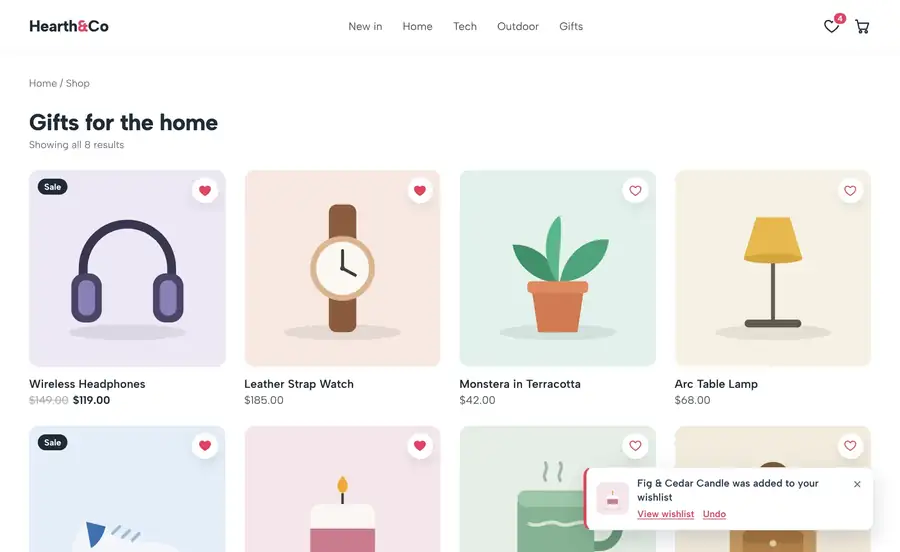
The product is saved straight away, with a small notice and a link to the wishlist.
Guests can save too
A guest’s wishlist moves into their account when they log in or register.
They share or come back
Shoppers send their list to friends and family, or return to see what has changed.
You make the sale
One click adds an item, or the whole list, to the cart, ready for checkout.
Every saved product is a customer telling you what they want to buy next. A wishlist gives them an easy way back to it.
Wishlist Button
Add to wishlist from anywhere in your store
Choose where the button appears and how it looks, with no code needed.
Product Pages
Show the button after or before the add to cart button, or after the product summary.
Shop & Category Pages
A heart on every product in your shop, category and tag archives.
Product Blocks
Added to the WooCommerce Product Collection and single product blocks automatically.
Heart Over the Image
Place a round heart button over the product image for a clean, modern look.
Variable Products
Saves the chosen variation and its options, so shoppers find the exact item again.
Your Style
Icon, icon and text, text link or button, with heart, star or bookmark icons and your own wording.
Header Counter
Show the number of saved items with a shortcode, a block or an automatic menu item.
Floating Heart
An optional floating heart that keeps the wishlist one tap away on every page.
Alerts & Reminders · PRO
Give shoppers a reason to come back
PRO emails shoppers when something they saved changes, grouped into one tidy digest.
Price Drop Alerts
Email shoppers when a product on their wishlist goes down in price or on sale.
Back in Stock Alerts
Tell shoppers as soon as a sold-out product they saved is available again.
Low Stock Alerts
Let shoppers know when only a few of a saved product are left.
Reminder Emails
Send a friendly reminder about saved items, with an optional personal coupon.
Wishlist Button
One tap to save, from any product
Shoppers tap the heart on the shop page, the product page or inside the product blocks. The product is saved instantly, with a small notification, a link to their wishlist and an undo button.
Guest wishlists
Guests can save products without an account. Their list is kept for 30 days by default and moves into their account when they log in.
Social proof
Show “12 people have saved this” on product pages to give other shoppers a nudge.
Fast and cache friendly
No jQuery on the storefront, no database queries for visitors with an empty wishlist, and it works with full-page caching.
Wishlist Page
A wishlist page your customers will love
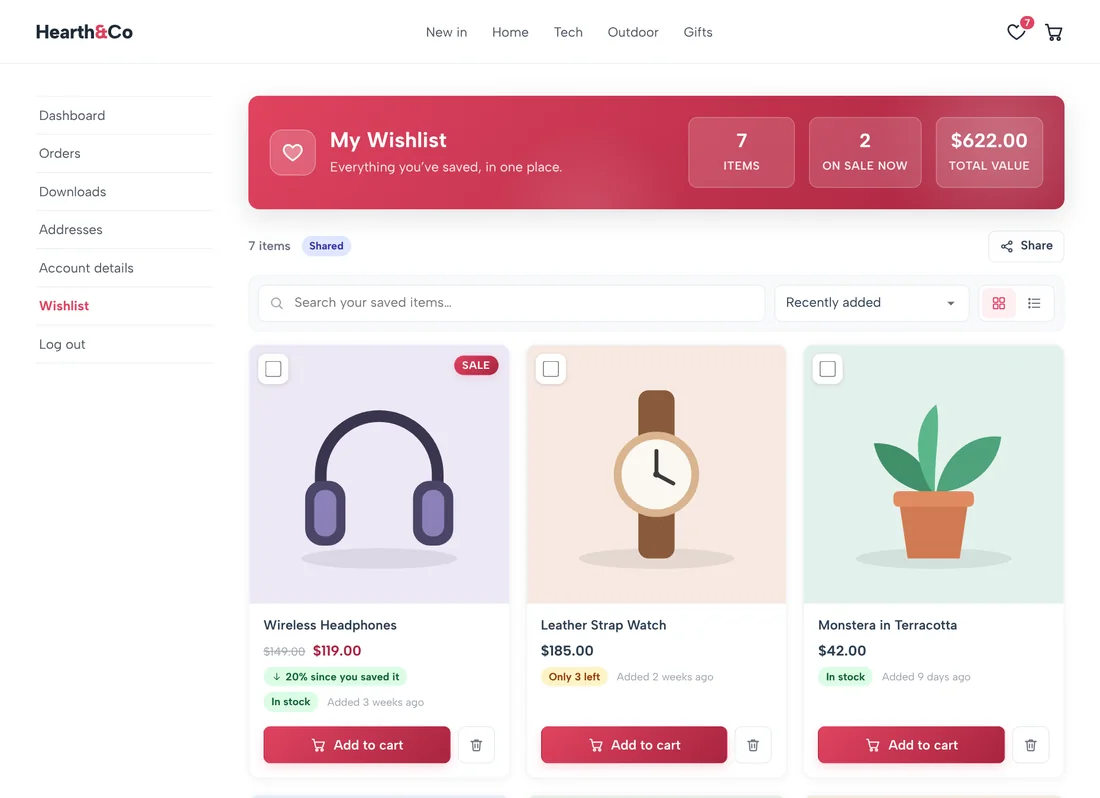
Everything a shopper has saved is on its own page and under a “Wishlist” tab in My Account, with a clear view of what is saved, what is on sale and how prices have changed.
Price since you saved it
Badges show how much a price has gone up or down since each item was saved.
Add all to cart
Add one item, a selection or the whole list to the cart in a single click.
Grid or table view
Shoppers switch views, search their list, sort it and remove items with an undo.
Sharing
Let shoppers share their lists with friends and family
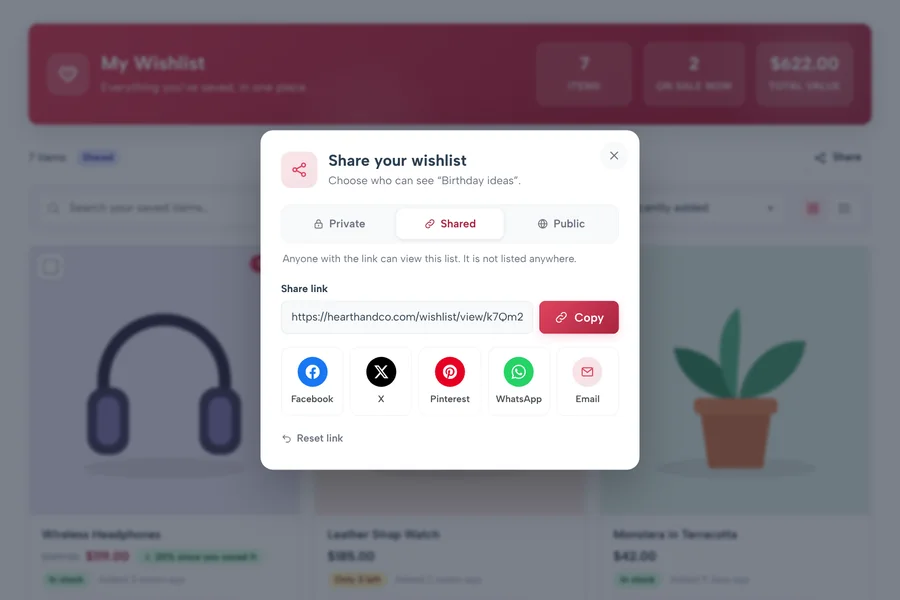
Each wishlist can be private, shared with a link, or public. Shoppers copy the link or share it on Facebook, X, Pinterest, WhatsApp or by email, and every visit brings a potential new customer to your store.
Private, shared or public
Shoppers choose who can see each list, and can reset the link at any time.
Plain share links
Share buttons are simple links, so nothing loads from social networks until a shopper clicks.
Email a friend · PRO
Shoppers send their wishlist by email straight from your store.
Admin Dashboard
See what your customers want most
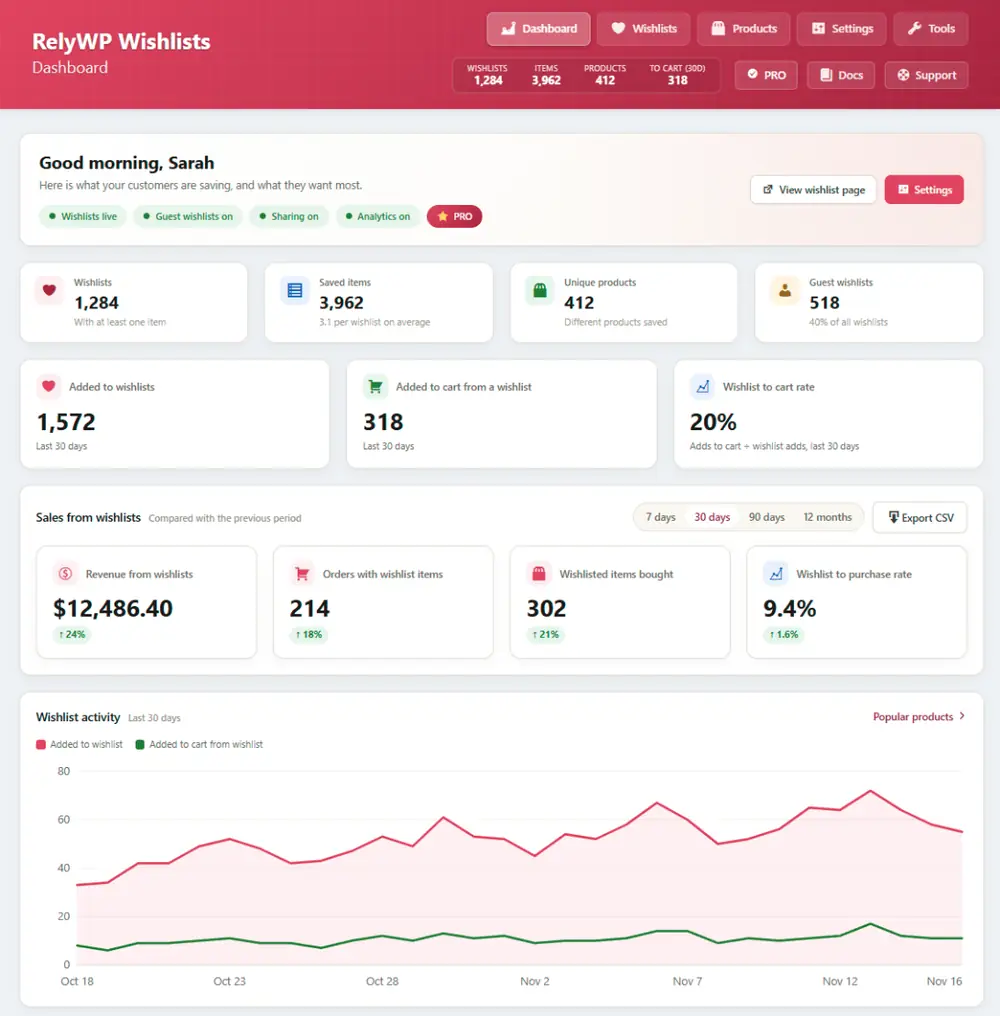
The wishlist dashboard shows how many lists and saved items you have, a 30-day trend and your most wishlisted products, so you know what to promote and what to restock.
Most wishlisted products
See which products are saved most, with their stock and price at a glance.
Browse and export
View every wishlist, the customer behind it and what is in it, and export to CSV.
Advanced analytics · PRO
Track the orders and revenue that came from wishlists, and the conversion rate for each product.
Multiple Wishlists · PRO
Let shoppers keep a list for every occasion
Shoppers create, rename and organise as many lists as they need, from birthday ideas to things for the new house, and move or copy items between them.
Notes, priority and quantity
Shoppers add a note, a priority and a desired quantity to each item.
Print and download
A printable view and a CSV download for any list.
Save for later
Shoppers move items from the cart into a “Saved for later” list, and back again when they are ready.
Gift Registry · PRO
Turn any wishlist into a gift registry
Gift registry mode adds an event date and keeps track of which items have been bought, so friends and family do not buy the same present twice.
Event dates
Shoppers set a date for a birthday, wedding or baby shower on the list.
Purchased by tracking
Bought items are marked on the list, along with who bought them.
Easy to share
Send the registry to guests with a private link or by email.
Campaigns · PRO
Email everyone who wants a product
Promotional campaigns let you email every shopper who has a product on their wishlist, with an optional coupon, when you run a sale or want to move stock.
Target by product
Choose a product and reach every shopper who saved it.
Optional coupon
Add a discount code to give shoppers an extra reason to buy now.
Works with your tools
Wishlist triggers for FunnelKit Automations and AutomateWoo: item added, price dropped and back in stock.
And so much more
Everything you need, all in one plugin
A complete wishlist toolkit for WooCommerce, with no add-ons to buy.
Setup Wizard
Get running in a couple of minutes. The wizard creates your wishlist page for you.
One-Click Import
Move wishlists across from YITH, TI WooCommerce Wishlist, WPC Smart Wishlist and WooCommerce Wishlists.
Shortcodes & Blocks
Wishlist, Wishlist Button and Wishlist Counter, as shortcodes and as blocks.
Page Cache Friendly
Buttons and counters are the same for every visitor, so pages can be cached as usual.
Ask for an EstimatePRO
Shoppers request a quote for the items on their wishlist.
Button RulesPRO
Hide the button for chosen products, categories, tags or user roles.
RelyWP IntegrationsPRO
Show “Earn X points” with Simple Points and Rewards, and the store credit balance with Simple Store Credit.
Translation Ready
Fully translatable, with WPML and Polylang support.
Privacy Tools
Suggested privacy policy text and support for the WordPress personal data export and erase tools.
Developer Friendly
Theme-overridable templates, plus functions and hooks for developers.
HPOS & Block Checkout
Compatible with High-Performance Order Storage and the Cart and Checkout blocks.
Priority Support
Fast, friendly help from the developer whenever you need it.
Loved by store owners
Here’s what store owners say about our plugins
Simple Wishlists is brand new, so it has no reviews of its own yet. These are for the other RelyWP plugins, running on 248,000 WooCommerce stores.
This plugin did exactly what we needed. What is even more impressive is that we had some glitches, and the service we received was beyond spectacular. I have nothing but positive things to say about the plugin and service. Highly recommended!
@jamilhindi
Points & Rewards · WordPress.org
It has all the features I was looking for and is very easy to use, I’m very happy to have it.
@ingluisnavas
Coupon Affiliates · WordPress.org
Does what it says it does. Lightweight, regularly updated. Very good plugin – thank you for the great work!
@medici
reCAPTCHA for WooCommerce · WordPress.org
A wonderful plugin! You can tell it has been made with love.
Alberto Carrion
Coupon Affiliates · WordPress.org
Pricing
Get started today, risk-free
Pro Monthly
$9.99
$4.99
Per month
- 1 website license
- All PRO features for 1 month
- Plugin updates for 1 month
- Premium support for 1 month
Pro Yearly
$79.99
$39.99
Per year
- 1 website license
- Access all PRO features
- Plugin updates for 1 year
- Premium support for 1 year
Pro Lifetime
$299.99
$149.99
One-time payment
- 1 website license
- Access all PRO features
- Plugin updates forever
- Premium support included
Have a question first?
Send us a message and we’ll help you decide if Simple Wishlists PRO is right for your store.
Discounts apply to the first payment only; renewals are at normal pricing. The price you sign up at stays the same for as long as your subscription is active. Pricing is in USD and excludes applicable VAT. An active PRO subscription is required for ongoing updates and support.
Free vs PRO
Compare the free and PRO versions
The free version gives you fast, good-looking wishlists with guest support and sharing. PRO adds multiple lists, price and stock alerts, reminders, campaigns, a gift registry and advanced analytics.
| Feature | Free | PRO |
|---|---|---|
| Wishlist button | ||
| Add to wishlist on product pages, shop pages and product blocks | ||
| Heart button over the product image | ||
| Icon, text link or button styles with your own wording | ||
| Variable product support | ||
| Header counter, floating heart and “people have saved this” | ||
| Hide the button by product, category, tag or user role | ||
| Wishlists | ||
| Guest wishlists that move into the customer’s account | ||
| Wishlist page and My Account tab with grid and table views | ||
| Price since saved, stock status and add all to cart | ||
| Multiple wishlists for each shopper | ||
| Notes, priority and desired quantity on items | ||
| Printable view and CSV download | ||
| Save for later from the cart | ||
| Gift registry mode | ||
| Ask for an estimate | ||
| Sharing and emails | ||
| Share by link, Facebook, X, Pinterest, WhatsApp and email | ||
| Email a wishlist to a friend | ||
| Price drop, back in stock, on sale and low stock alerts | ||
| Reminder emails with an optional coupon | ||
| Promotional campaigns | ||
| Admin | ||
| Wishlist dashboard with stats and most wishlisted products | ||
| Browse every wishlist and export to CSV | ||
| Import from other wishlist plugins | ||
| Advanced analytics: orders and revenue from wishlists | ||
| Integrations with Points and Rewards, Store Credit, FunnelKit and AutomateWoo | ||
| Support | ||
| Help when you need it | Free support | Priority support |
Start free, upgrade any time. PRO includes every free feature, so your button, wishlist page and settings stay exactly as they are when you upgrade.

Protected by our 14-day money-back guarantee
We look forward to helping you bring more shoppers back to your WooCommerce store. But if things don’t work out, simply contact us within 14 days of upgrading and we’ll refund 100% of your money, no questions asked.

Elliot Sowersby
Founder & Lead Developer
Here to help
Questions? We’ve got you covered
Is there a free version?
Yes. The free version includes the wishlist button on product pages, shop pages and product blocks, guest wishlists, the wishlist page and My Account tab, sharing, the header counter, the admin dashboard and the import tool. PRO adds multiple wishlists, price drop and stock alerts, reminder emails, campaigns, a gift registry, save for later, estimates, advanced analytics and integrations.
Where do shoppers find their wishlist?
On the wishlist page, which the setup wizard creates for you, and in the “Wishlist” tab under My Account. The header counter and the floating heart link there too.
Can guests use the wishlist?
Yes. Guest wishlists are kept for 30 days by default (you can change this) and move into the customer’s account when they log in or register. You can also require shoppers to log in first.
Does it work with page caching?
Yes. The wishlist buttons and counters are the same for every visitor, so pages can be cached as usual. Each shopper’s saved items are loaded with one small request, and only for shoppers who have a wishlist.
Does it work with block themes?
Yes. Buttons are added to the WooCommerce Product Collection and single product blocks automatically, and there are blocks for the wishlist, the button and the counter.
Can I move wishlists from another plugin?
Yes. Go to Wishlists > Tools > Import to bring wishlists across from YITH WooCommerce Wishlist, TI WooCommerce Wishlist, WPC Smart Wishlist or WooCommerce Wishlists.
Is it compatible with HPOS and the block checkout?
Yes. Simple Wishlists declares compatibility with WooCommerce High-Performance Order Storage and the Cart and Checkout blocks.
Can I change how the wishlist looks?
Yes. Choose the button style, icon, colours and wording in the settings. Developers can also copy any template to yourtheme/relywp-wishlists/ and edit it there.
What data does it store?
Each wishlist and its items, the price when each item was saved, and wishlist activity statistics. Guests are identified by a random cookie. The plugin adds suggested text to your privacy policy guide and supports the WordPress personal data export and erase tools.
How does the free trial work?
Pick a plan in the pricing table above and start the 7-day free trial. You can cancel any time, and every plan comes with a 14-day money-back guarantee.
Ask a Question
Have a pre-sale question, or already a PRO user? Send us a message directly.
Contact Us →Documentation
Our docs explain everything you need to know about setting up our plugins.
View Documentation →More Plugins
Simple Wishlists works great alongside our loyalty, store credit and affiliate plugins.
Browse Plugins →Bring shoppers back to buy what they love
Give every shopper a wishlist worth coming back to. Try Simple Wishlists PRO free for 7 days, backed by a 14-day money-back guarantee.