






In the UK, people who are chronically sick or disabled can buy certain goods without paying VAT, as long as the goods are for their own personal or domestic use. It is usually called disability VAT exemption, though HMRC calls it VAT relief: eligible goods are zero-rated when you sell them to an eligible customer.
If you sell mobility aids, daily living aids or other products designed for disabled people, customers will expect to claim it at checkout. WooCommerce can’t do that on its own. This guide covers the rules you need to know and how to set it up with our Tax Exemption for WooCommerce plugin.
How disability VAT relief works
Who qualifies
According to GOV.UK, a customer qualifies if they have “a physical or mental impairment which has a long term and substantial adverse effect” on their ability to carry out everyday activities, or a condition doctors treat as a chronic sickness, such as diabetes. Someone with a temporary injury, like a broken leg, doesn’t qualify, and neither does an older person who has no chronic condition. Customers don’t need to be registered disabled or receive any benefits.
Charities can also buy eligible goods VAT-free, but only when the charity makes them available to a disabled person for their personal or domestic use.
Which products qualify
Only goods designed or adapted for disabled people qualify. Examples include:
- Wheelchairs, class 1 and 2 mobility scooters and medical or surgical appliances
- Low vision aids
- Specialist beds, stair lifts, riser-recliner chairs, hoists and sanitary devices
- Goods designed solely for disabled people, such as white canes, braille embossers and incontinence products
- Emergency alarm call systems, and parts and accessories designed only for eligible goods
General products that happen to be useful to disabled people, like an ordinary armchair or a standard laptop, don’t qualify. Nor do standard hearing aids, glasses or contact lenses, which HMRC specifically excludes. As the seller, it is your job to decide which of your products are eligible, so check with the manufacturer or your accountant if you’re not sure.
What the customer has to give you
Customers confirm they are eligible with a written eligibility declaration. HMRC publishes a specimen declaration form, and you can use your own version. A few rules matter for an online shop:
- You can accept declarations online, but they must be clearly separate from the order itself. HMRC says your checkout shouldn’t lead customers to declare eligibility automatically, for example with one tick that both places the order and claims the relief.
- Customers don’t need to give you a doctor’s letter or other medical proof. The signed declaration is the record HMRC expects you to keep.
- You keep the declarations with your VAT records, for as long as you keep those records. You don’t send them to HMRC.
The full rules are in HMRC’s VAT Notice 701/7.
How to set it up in WooCommerce
Tax Exemption for WooCommerce adds a separate “claim tax exemption” form to your checkout. When a customer fills it in, the VAT is removed from their order before they pay, and their details are saved with the order.
- Install the plugin. Go to Plugins › Add New Plugin, search for “Tax Exemption for WooCommerce”, then install and activate it. It’s also available on WordPress.org.
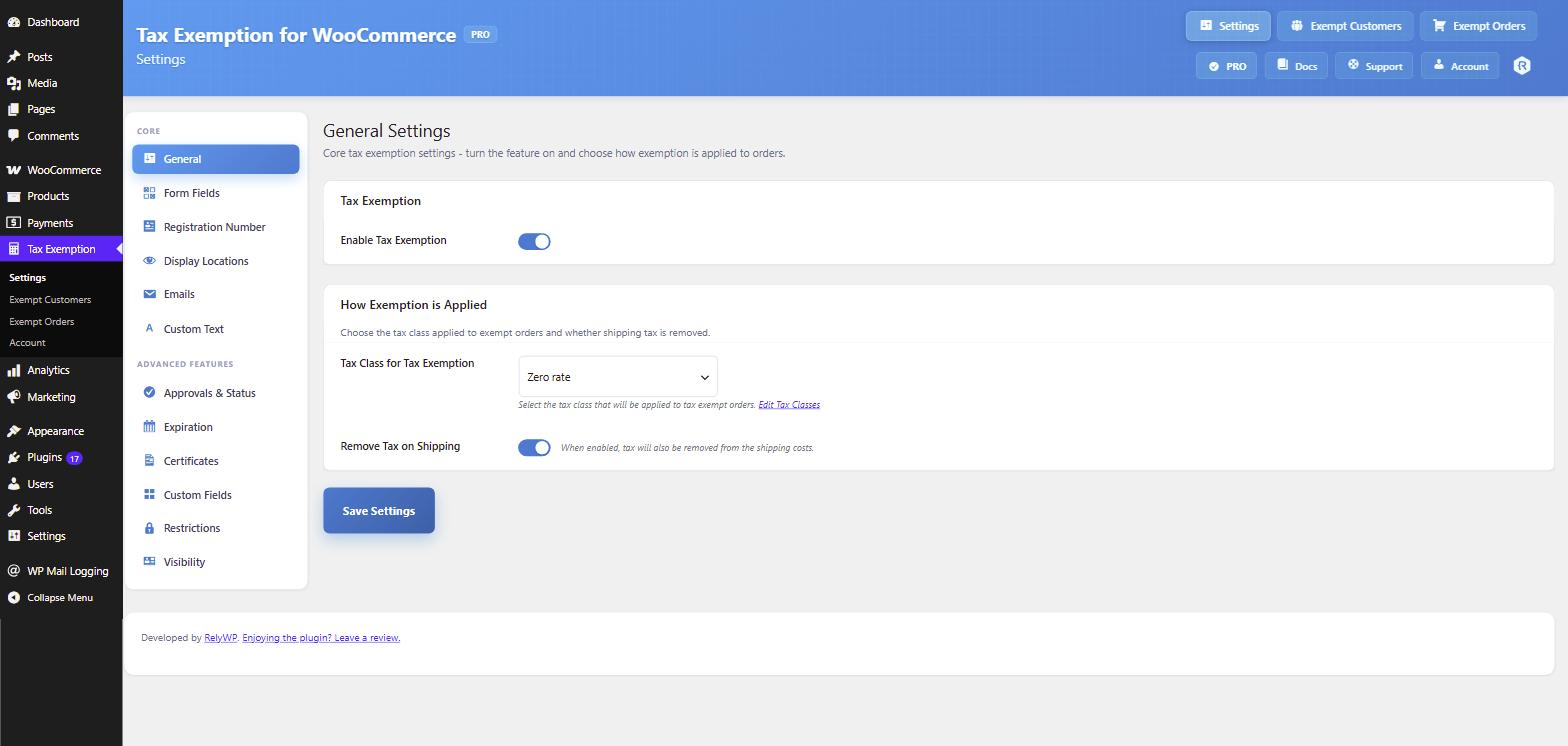
- Set the tax class. Go to Tax Exemption › Settings. On the General tab, set “Tax Class for Tax Exemption” to Zero rate. The plugin creates this 0% class for you if it doesn’t exist.
- Decide about delivery. “Remove Tax on Shipping” is on by default. Check with your accountant whether VAT should also come off delivery charges for the products you sell.
- Set up the declaration fields. On the Form Fields tab, keep the Name and Reason fields turned on and required. Relabel them so they match the declaration, for example “Name of the disabled person” and “Your disability or chronic condition”.
- Test it. Add an eligible product to your cart, go to checkout, tick the exemption box and fill in the form. The VAT line should drop to zero before you place the order.
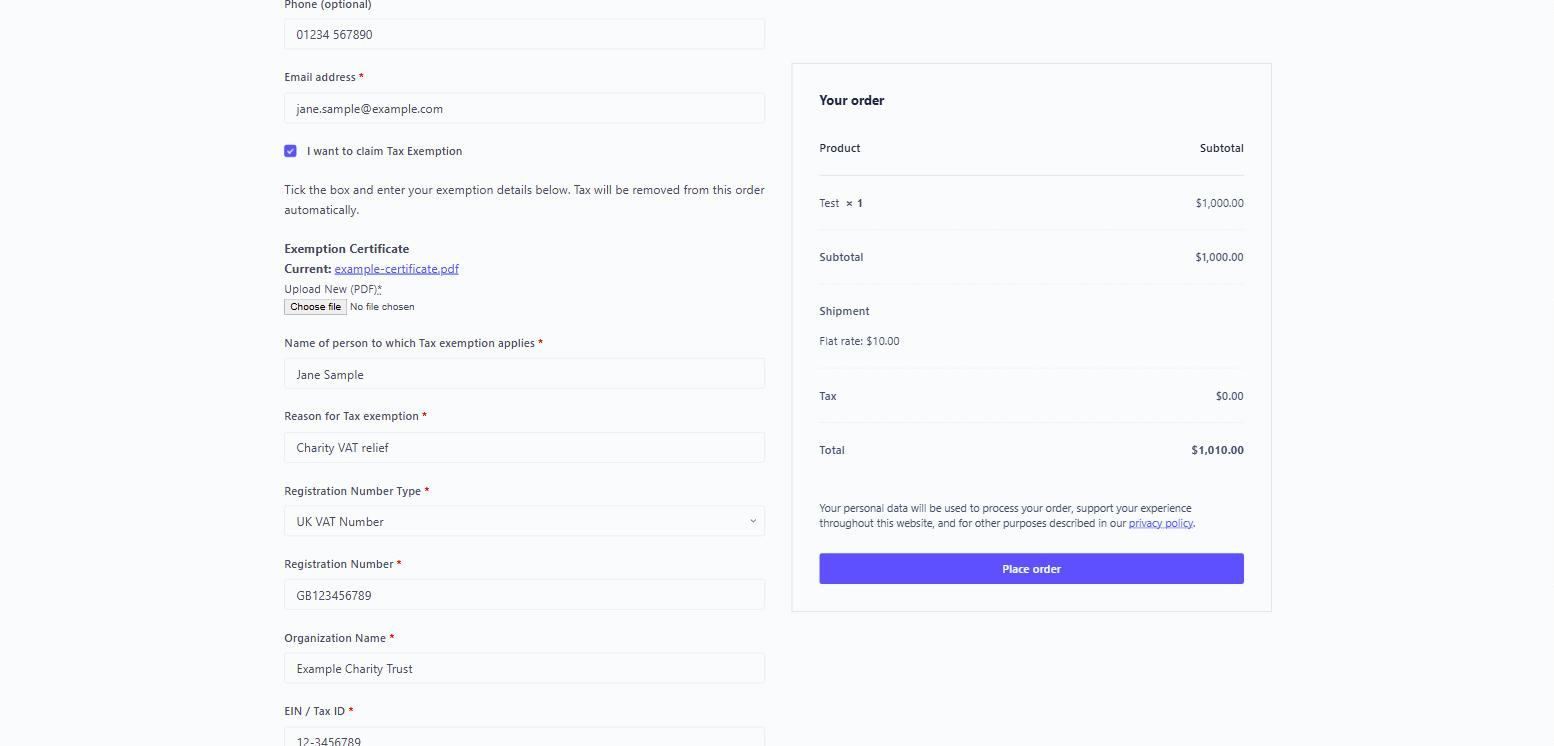
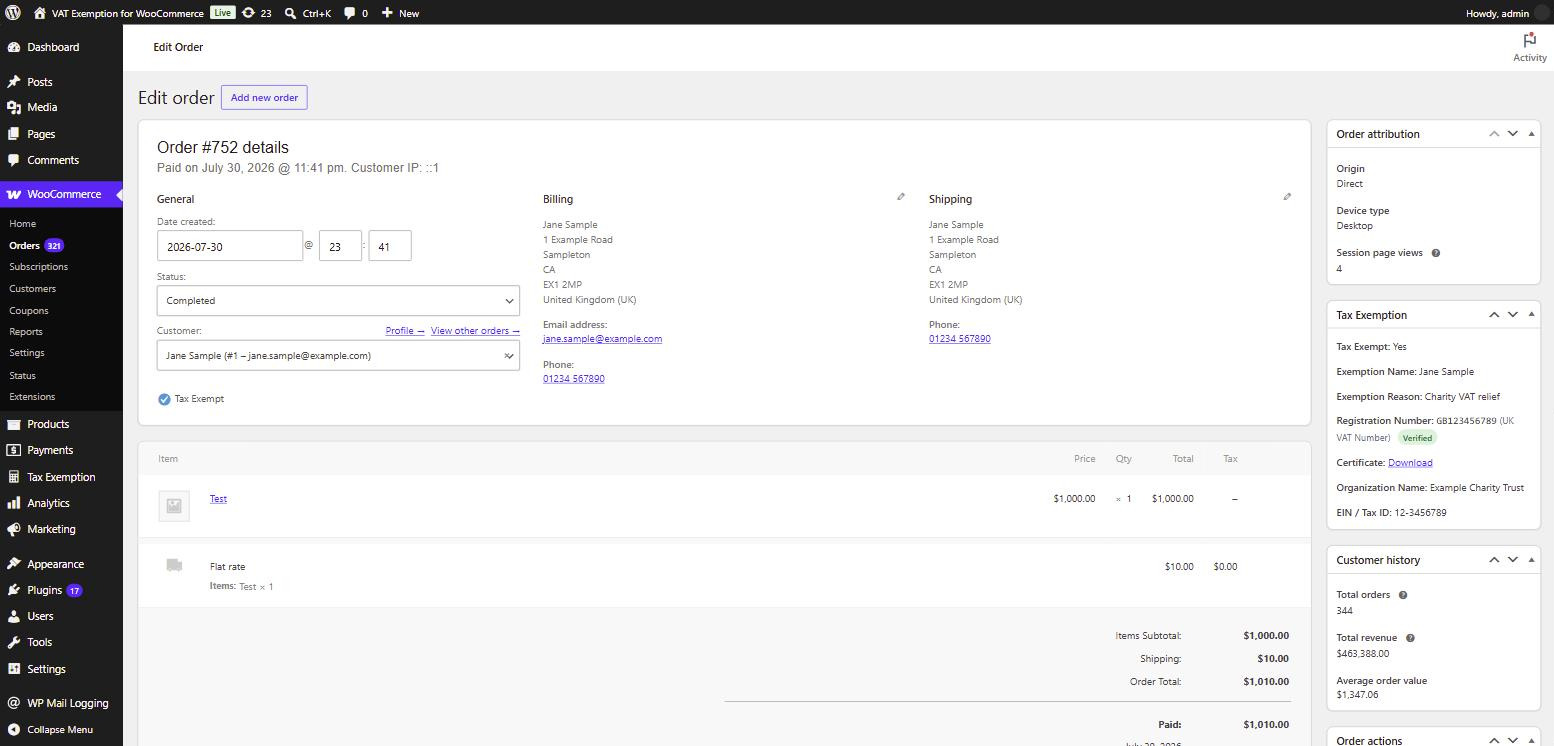
When the order is placed, the customer’s declaration details are saved to the order, and to their account if they’re logged in, so returning customers don’t have to fill the form in again. That gives you the record HMRC expects you to keep alongside your VAT records. You can also show the details in a Tax Exemption panel on each order, by turning on “Edit Order Page” in the Display Locations tab.
If you also sell products that don’t qualify
This is the part to get right. In the free version, a successful claim removes VAT from the whole order. That’s fine if every product in your shop is eligible. If you also sell general items, a customer could claim relief on those too, and you would owe the VAT.
The PRO version fixes this with the “Specific products only” option on the Restrictions tab. Tick “Tax Exempt Product” on the General tab of each eligible product, and VAT is only removed from those products. Everything else in the same order is charged VAT as normal.
Other PRO features that help with disability VAT
- A separate declaration statement: add a required checkbox as a custom field, such as “I declare that I am chronically sick or disabled and these goods are for my personal use”, so the customer confirms eligibility separately from placing the order.
- Manual approval: approve each customer before the relief applies to their orders, if you want to check their details first. This works for customers with an account, who submit their details from their My Account page.
- Exempt orders export: filter every exempt order and export them to CSV for your records or your accountant.
- UK only: limit the exemption to UK billing or delivery addresses.
PRO costs $10 a month, $79 a year or $239 for a lifetime licence, with a 7-day free trial and a 14-day money-back guarantee. The Tax Exemption documentation covers every setting in detail.
Before you start
Work out which of your products qualify, set up the declaration so it is clearly separate from the order, and decide how you’ll handle mixed baskets. Then install the free version and place a test order.
This guide is general information, not tax advice. Check with an accountant that your products qualify and that your process meets HMRC’s rules before you start selling goods VAT-free.

Our plugins
Grow your WooCommerce store
Affiliates, loyalty points, store credit, tax exemption and more – trusted on 248,000+ sites.
Comments